SWHub
A Go studying and playing app with offline puzzles, KataGo analysis, pattern search, online play, and many more tools.
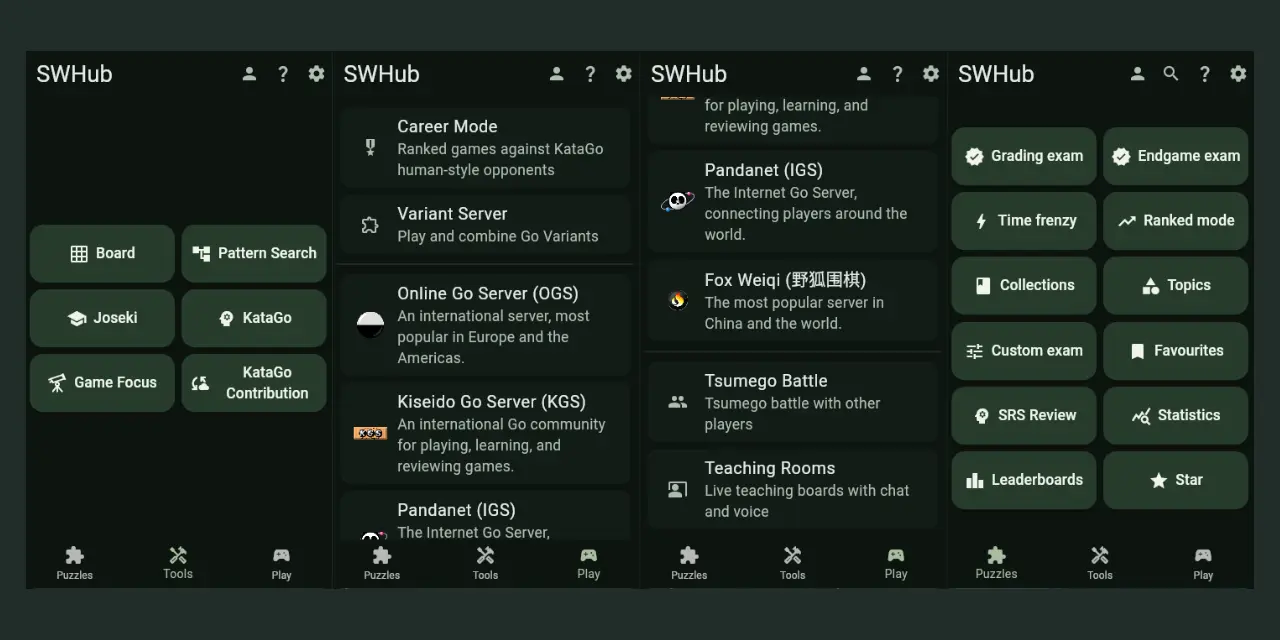
SWHub is my Go/Baduk/Weiqi study and play app, developed from my WeiqiHub fork. It brings together puzzle training, KataGo analysis, game review, pattern search, online play, and progress tracking on Windows, Linux, macOS, and Android.
Its strongest areas are KataGo analysis, tsumego training, and pattern search—three connected tools for understanding positions, testing your reading, and finding recurring shapes in real games.
Download SWHub
Download the latest release on GitHub.
| Platform | Download |
|---|---|
| Android | Universal APK |
| Linux | x64 AppImage |
| macOS | Universal DMG |
| Windows | x64 installer or portable EXE |
On first use, open Puzzles or Joseki while online to download their data. Installed puzzles, the joseki dictionary, saved Game Focus reviews, local statistics, and your study files remain usable offline. Engine-based modes need a configured KataGo engine, a remote engine needs an internet connection.
What You Can Do
Study your SGF collection
Import individual SGFs or complete folders in SGF Management. Keep a personal library, remove duplicates during import, and explore games in context.
Search positions and openings
Use Pattern Search to investigate games through Fuseki, Joseki, or a selected board area. Narrow results with metadata filters, save useful snapshots and search history with pattern thumbnails, then open a game directly from the results. Build a library from your own games or use portable database imports and exports. My personal professional-game database is shared separately with friends and coffee supporters.
Explore joseki
Download the Joseki dictionary for offline opening study. Dictionary updates are independent of app releases, so you can refresh the data without reinstalling SWHub.
Train consistently
Work through collections, topics, exams, Ranked Mode, and Time Frenzy. Favourites replaces the old My Mistakes list, while SRS handles scheduled mistake reviews. Custom exams can draw from Favourites or SRS.
Breakthrough alternates best-move and who-is-ahead puzzles under a 60-second limit.
Subjects offers eight study categories with sequential rank progression and HumanSL opponents. Subjects and Career Mode require both regular KataGo and HumanSL model.
Analyse games with KataGo
Use a local KataGo engine or connect to a remote WebSocket engine. Study score, win-rate and point-loss graphs, ownership, variations, and performance reports. Comparison boards can show suggested, played, or Intuition lines. Career Mode uses HumanSL opponents with varied styles and an 18K–9D promotion ladder.
Desktop Auto Setup helps install a local engine. Android local KataGo is experimental: download and test it in Settings → Local KataGo before enabling it. Available CPU, OpenCL, and Qualcomm NPU options depend on the device and published engine packages.
For remote setup, see the Free Cloud KataGo guides.
Turn your games into a study plan
Game Focus imports complete games into separate profiles, queues KataGo analysis, saves reviews for offline use, and turns mistakes into drills with their own review schedule. New analysis requires HumanSL and a supported target rank, existing saved reviews stay available without starting an engine.
Review, play and teach together
Use the local board for variations, comments, markups, score estimation, SGF editing, and board-photo import. Play on OGS, KGS, Pandanet, FoxWQ, or Variant Server, and join shared-lobby Tsumego Battles. The unofficial, experimental Tygem client adds profiles, live watching, room chat, negotiated games, and 19×19 auto-match. Past games can be downloaded as SGFs or opened in KataGo.
Variant Server supports custom boards up to 52×52, board presets, and supported variant combinations. Teaching Rooms use password-gated access and support shared boards, chat, voice, and student move assignment.
Keep your progress with you
Sync training history and favourites between compatible devices, or keep local statistics without a sync account. On Android, Settings → Backup and restore offers separate Statistics and Game Focus ZIP exports. SGFs and Pattern Search libraries need their own backups. On desktop, close the app before copying your Documents/SWHub folder.
Optional cloud statistics backups expire after 365 days without a successful sync. Local statistics remain, but sync does not back up SGFs, Game Focus, or Pattern Search libraries. Keep separate file backups.
Upgrading from an Older Version
Install and open v0.2.13 before moving from an older version to v0.2.14 or later. Let its saved-data preparation finish, including profiles and features you have not opened. No server login, puzzle download, or running engine is needed for this step. Existing statistics backup files remain supported.
Read the v0.2.13 upgrade instructions, published on 9 November 2026.
Release Notes
Read the latest release notes on GitHub.
When upgrading, update every device sharing your sync account and install compatible puzzle data. Keep your existing username and key.
Need Help?
Open Settings → FAQ in the app, or use the ? button. On desktop, F1 opens shortcut search and F2 opens Settings. Report problems through GitHub issues or Discord.
Future community announcements will also appear in the OGS project thread and maybe(yeah maybe) in r/baduk app discussion.